Understanding Context Bleed and Context Rot in Chat Models
Most people using AI tools like ChatGPT have experienced it.
A conversation starts off sharp and productive. The responses feel thoughtful, organized, and surprisingly helpful. Then, somewhere along the way, things begin to drift. The AI gets repetitive. It starts ignoring instructions. Tone changes unexpectedly. Responses become cluttered or oddly disconnected.
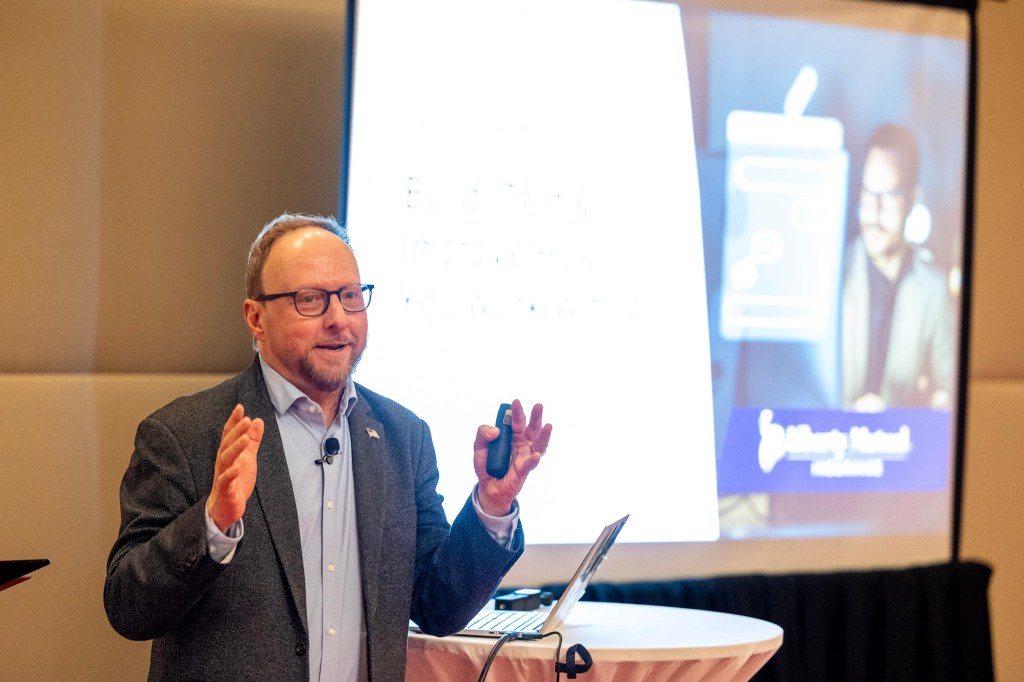
According to Dale Steinke, Director with Agent for the Future Advisors at Liberty Mutual, this is not user imagination — it’s a real phenomenon happening inside modern chat models.
During his AI Prompt Lab session at Go Big 2026, Steinke introduced attendees to two concepts becoming increasingly important in the AI space: context bleed and context rot.
The Models Just Do Really Strange Things Over Time
Dale Steinke
Steinke explained that chat-based AI models operate with a limited form of short-term memory. As conversations grow longer and more complicated, the system begins struggling to maintain clarity.
“There’s a thing called context bleed and context rot,” Steinke explained. “When you are working in a chat, it has a limited amount of short-term memory, and after a while it starts to forget things.”
That gradual forgetting is what he refers to as context rot — the slow degradation of a model’s ability to accurately track earlier instructions, priorities, and information within a conversation.
At the same time, unrelated information from earlier parts of the chat can start leaking into newer tasks, creating what Steinke describes as context bleed.
“What I see people do a lot of times, they’ll start a chat, and they’ll just keep working in it all day,” he said. “Then they dump in some other thing. ‘Hey, I did this cyber thing, now I’m asking it to give me a recipe,’ and it’s like, ‘I don’t know where you’re going with this, but I’m going to try and pull that cyber thing into that recipe.’”
The result can be confusing, inaccurate, or strangely blended responses that feel increasingly disconnected from the user’s original intent.
The “Too Many Tabs Open” Problem
To explain the issue, Steinke compared long AI chats to a browser overloaded with tabs.
“A good example of context rot is if you have a browser that’s got too many tabs open,” he said. “They’re just making the computer slow.”
He also used a memorable metaphor comparing AI conversations to kitchen tools.
One option, he explained, is like a cluttered whiteboard filled with half-erased notes layered on top of each other. The other is like a clean cutting board, reset between tasks.
“The point again is a fresh chat gives you better responses,” Steinke emphasized.
For users trying to get more consistent results from AI, this simple shift may be one of the most effective habits they can adopt.
Why Starting Fresh Often Works Better
One of the strongest takeaways from the session was surprisingly simple:
Start a new chat for each major task.
Rather than treating AI like a running conversation that lasts forever, Steinke encouraged users to compartmentalize their work. Separate brainstorming from research. Separate marketing copy from technical analysis. Separate client communication from unrelated experimentation.
Doing so reduces context contamination and gives the model a cleaner environment to work within.
“It starts to take longer to do things,” Steinke noted of overloaded chats, “because it’s forgetting what it talked about earlier.”
That slowdown can quietly reduce both quality and efficiency without users realizing why.
AI Is Starting to “Show Its Work”
Another emerging trend Steinke highlighted is transparency.
As prompts become more sophisticated, modern AI systems are beginning to reveal more of their reasoning process in real time.
“You notice how it’s starting to tell you what it’s doing?” Steinke said while demonstrating a more complex prompt. “They’re trying to make it a little more transparent that it’s actually doing some work in the background.”
This movement toward visible reasoning could become increasingly important as AI tools are used for more advanced business decisions, content creation, and operational workflows.
Flexible Prompting and the Future of AI Workflows
Steinke also introduced attendees to the concept of wildcards within prompts — placeholders that make instructions reusable across multiple scenarios.
Instead of writing an entirely new prompt every time, users can build flexible frameworks that adapt to different industries, insurance products, or client situations.
He also demonstrated how AI tools can analyze existing content by pulling information directly from webpages or blog posts using inserted URLs, provided the model has web access enabled.
The broader lesson was clear: AI works best when users understand not only what the technology can do, but also how its limitations affect output quality.
The Real Takeaway
The most important insight from Steinke’s session may have been this:
AI is not failing randomly. Often, the conversation itself has become too cluttered for the model to process effectively.
Understanding concepts like context bleed and context rot gives users a practical framework for improving AI performance immediately — not by using more complicated tools, but by structuring conversations more intentionally.
Sometimes the smartest thing you can do with AI is simply start fresh.
We use cookies to remember your preferences, understand how you interact with our website, and improve your browsing experience. Learn more about how we use and protect your information in our Privacy Policy.
Cookie Preferences
Manage your cookie preferences below:
Essential cookies enable basic functions and are necessary for the proper function of the website.
Name
Description
Duration
Cookie Preferences
This cookie is used to store the user's cookie consent preferences.
30 days
These cookies are needed for adding comments on this website.
Name
Description
Duration
comment_author
Used to track the user across multiple sessions.
Session
comment_author_email
Used to track the user across multiple sessions.
Session
comment_author_url
Used to track the user across multiple sessions.
Session
Statistics cookies collect information anonymously. This information helps us understand how visitors use our website.
Google Analytics is a powerful tool that tracks and analyzes website traffic for informed marketing decisions.
Contains custom information set by the web developer via the _setCustomVar method in Google Analytics. This cookie is updated every time new data is sent to the Google Analytics server.
2 years after last activity
__utmx
Used to determine whether a user is included in an A / B or Multivariate test.
18 months
_ga
ID used to identify users
2 years
_gali
Used by Google Analytics to determine which links on a page are being clicked
30 seconds
_ga_
ID used to identify users
2 years
_gid
ID used to identify users for 24 hours after last activity
24 hours
_gat
Used to monitor number of Google Analytics server requests when using Google Tag Manager
1 minute
_gac_
Contains information related to marketing campaigns of the user. These are shared with Google AdWords / Google Ads when the Google Ads and Google Analytics accounts are linked together.
90 days
__utma
ID used to identify users and sessions
2 years after last activity
__utmt
Used to monitor number of Google Analytics server requests
10 minutes
__utmb
Used to distinguish new sessions and visits. This cookie is set when the GA.js javascript library is loaded and there is no existing __utmb cookie. The cookie is updated every time data is sent to the Google Analytics server.
30 minutes after last activity
__utmc
Used only with old Urchin versions of Google Analytics and not with GA.js. Was used to distinguish between new sessions and visits at the end of a session.
End of session (browser)
__utmz
Contains information about the traffic source or campaign that directed user to the website. The cookie is set when the GA.js javascript is loaded and updated when data is sent to the Google Anaytics server